How to read Excel File using Java?
Read Excel File using Java
Normally, to read a data in excel, first we should have access to workbook, sheet which we want to read as workbook contains multiple sheets and if you want to read a particular cell we need location of a Cell.
In this article, we will discuss how to access workbook, sheet and a Cell using Apache Poi Library Download Apache Poi jar and add it to build path.
You can also consider using Apache Poi Library to perform read and write operations with excel sheets because of its better documentation, more features, active development, and Excel 2007+ format support.
As we know JXL doesn't support Excel 2007 ".xlsx" file format. It only supports the old BIFF (binary) ".xls" format. Where as Apache POI supports both Excel 2003 - xls and Excel 2007 - xlsx file formats.
To start with gaining access to Workbook, we should always remember the below command:
In order to write anything we need to first create a writable workbook as below which creates the workbook object.
To get the sheet, you should specify as below:
To Iterate the rows and column you should write the code as below:
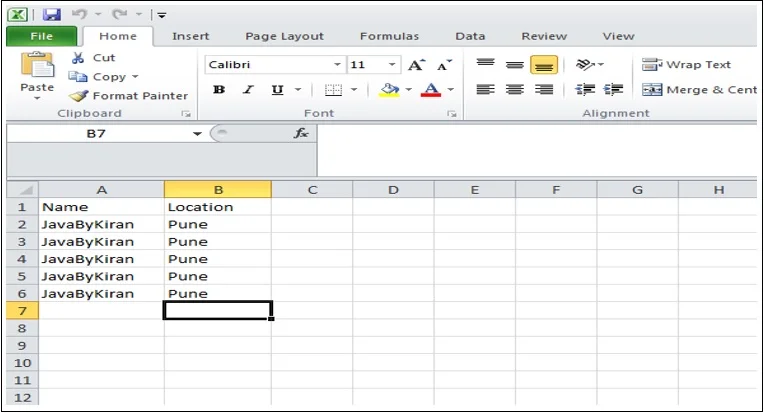
The below is the input sheet for the example program:
The below is the input sheet for the example program:
Output For name and location as:
FileInputStream inputStream = new FileInputStream(excelFilePath);
Workbook workbook = new XSSFWorkbook(inputStream);
Sheet firstSheet = workbook.getSheetAt(0);Iterator<Row> rowIterator = firstSheet.iterator();
rowIterator.next(); // skip the header row
while (rowIterator.hasNext()) {
Row nextRow = rowIterator.next();
Iterator<Cell> cellIterator = nextRow.cellIterator();
while (cellIterator.hasNext()) {
Cell nextCell = cellIterator.next();
int columnIndex = nextCell.getColumnIndex();
System.out.println(nextCell);
}
}
package com.javabykiran.readexcelfile;

import java.io.FileInputStream;
import java.io.IOException;
import java.util.Iterator;
import org.apache.poi.ss.usermodel.Cell;
import org.apache.poi.ss.usermodel.Row;
import org.apache.poi.ss.usermodel.Sheet;
import org.apache.poi.ss.usermodel.Workbook;
import org.apache.poi.xssf.usermodel.XSSFWorkbook;

public class JbkReadExcelFile {
    public static void main(String[] args) {

    String excelFilePath = "C:\\Users\\dell\\Desktop\\JavaByKiran.xlsx";

    try {

        FileInputStream inputStream = new FileInputStream(excelFilePath);
        Workbook workbook = new XSSFWorkbook(inputStream);

        Sheet firstSheet = workbook.getSheetAt(0);

        Iterator<Row> rowIterator = firstSheet.iterator();

        rowIterator.next(); // skip the header row

        while (rowIterator.hasNext()) {
            Row nextRow = rowIterator.next();
            Iterator<Cell> cellIterator = nextRow.cellIterator();
            while (cellIterator.hasNext()) {
                Cell nextCell = cellIterator.next();
                // int columnIndex = nextCell.getColumnIndex(); // This line will print index of column
                System.out.println(nextCell);
            }
        }

        workbook.close();

    } catch (IOException ex1) {
        System.out.println("Error reading file");
        ex1.printStackTrace();
      }
    }
}
    JavaByKiran
    Pune
    JavaByKiran
    Pune
    JavaByKiran
    Pune
    JavaByKiran
    Pune
    JavaByKiran
    Pune